

Onton Raises $7.5M As MIT, USPTO And No Barrier Show How AI Is Changing Business In 2025
Hi friends!
I’m thankful that you are here again, reading and playing along with us in this new AI game.
This week offers a great snapshot of how quickly the AI landscape is STILL moving. Every time I think we reach some sort of stasis…here we go again. We’ve got funding flowing into AI for shopping and healthcare, MIT giving us a clearer picture of which jobs AI can realistically take on, and the US government starting to clarify how AI inventions should be handled.
Let’s dig into what actually matters for your business, not just the headlines.
This Week’s Insights
AI Shopping Startup Onton Raises $7.5M
Onton, an AI shopping startup, just secured $7.5 million in seed funding. The company uses a neurosymbolic AI search engine that lets shoppers use natural language, images, or even creative concepts to find products. They report conversion rates 3x higher than typical ecommerce benchmarks.
My take: The traditional search bar is evolving into something much more intuitive. It’s a reminder that customer expectations are shifting toward natural language and visual context, rather than just rigid keywords. For anyone managing a digital storefront, the hidden takeaway is to look at how your catalog data is structured because the future of discovery will rely on how well machines can “see” and “read” your products to match that improved intent.
👉 Read the original story on FashionNetwork

MIT’s Iceberg Index: AI Could Replace 11.7% of US Jobs
A new MIT study, using a tool called the Iceberg Index, estimates that current AI could technically replace 11.7% of the US workforce representing about $1.2 trillion in wages. The research maps which specific tasks are economically viable to automate right now, highlighting pressure points in finance, healthcare, and professional services.
My take: It is easy to get stuck on the headline numbers, but the real value here is the framework. This moves the conversation from vague anxiety to a calculated cost-benefit analysis. For leaders, this acts as a prompt to audit workflows through a task-based lens. The opportunity isn’t necessarily to replace roles wholesale, but to identify the specific, high-cost tasks that slow a team down and are finally economically viable to offload. There will be more jobs created by AI than taken.

US Patent Office: AI Can Help Invent, But Only Humans Get Credit
The US Patent and Trademark Office (USPTO) issued new guidance clarifying that while AI can assist in creating inventions, only human beings can be listed as inventors on patent applications. The guidance treats AI tools like software or a microscopethey can support the process but can’t own the idea.
My take: This provides a much-needed layer of clarity for R&D. It reinforces the idea that AI is a tool for leverage, not a replacement for human ingenuity. For teams currently using these tools to brainstorm or prototype, this is the green light to keep innovating—provided there is clear documentation of where the machine ends and the human contribution begins. It turns governance into a competitive advantage for IP protection.
👉 Read the USPTO guidance breakdown on Digital Trends

Healthcare AI Startup No Barrier Raises $2.7M
No Barrier, a startup providing real-time, HIPAA-compliant medical interpretation in over 40 languages, raised $2.7 million. Their platform integrates directly into clinical workflows, aiming to slash interpreter wait times from 30-45 minutes to seconds.
My take: This is a perfect illustration of AI solving a specific, high-friction operational bottleneck. By cutting wait times from nearly an hour to seconds, the technology isn’t just saving money; it’s respecting the stakeholder’s time. It suggests that the best immediate use cases for automation are often found in the “waiting rooms” and holding patterns of your current operations, where friction costs are highest.

The Healthcare AI Funding Wave Continues
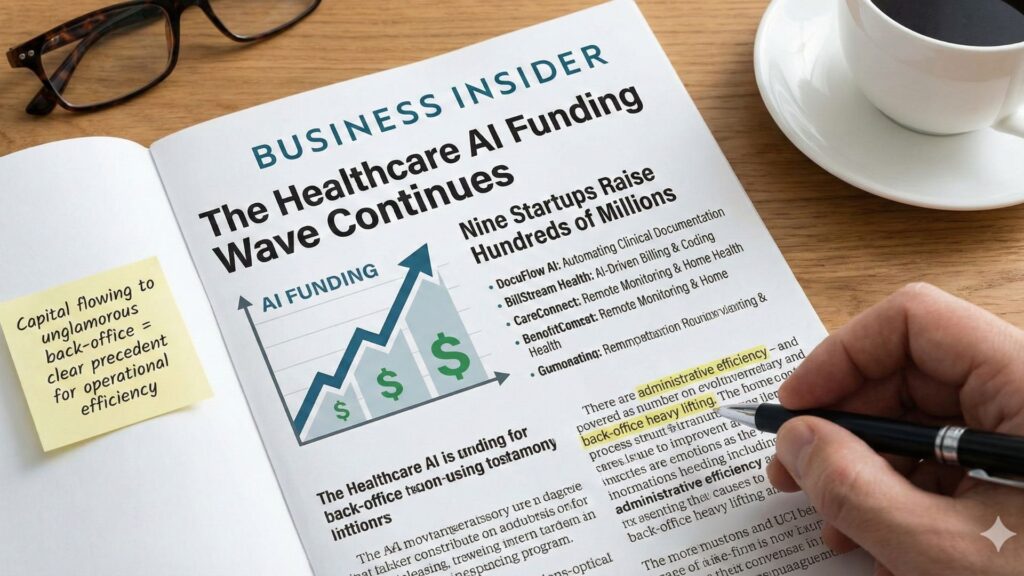
Business Insider profiled nine healthcare AI startups that have collectively raised hundreds of millions. These companies are automating everything from clinical documentation and billing to remote monitoring and home health logistics.
My take: There is a strong signal in where this capital is flowing. Investors aren’t just betting on flashy futuristic cures; they are betting on administrative efficiency. It validates the strategy of applying AI to the unglamorous, back-office heavy lifting billing, scheduling, and documentation. If highly regulated sectors are finding the ROI in clearing out paperwork, it sets a clear precedent for operational efficiency across the board.
Business Insider Profiled nine healthcare
How to format text as tables in Gamma
Hook:
Want your Gamma cards to look cleaner and easier to scan? Turn plain text into a table in one click.
Steps:
- Open the card that needs better organization.
- Highlight the text you want to convert.
- Click the Edit with AI button.
- Go to the Reformat section.
- Select Format as table.
Your plain text is instantly transformed into a neatly structured table, making your content easier to read and compare.
CTA:
Do not forget to subscribe for more Gamma tutorials and tips.
How to add math formulas in Gamma
Hook:
Need clean math notation in your Gamma presentation? Use the math block.
Steps:
- Go to the Insert menu.
- Select Basic blocks.
- Click the Math block icon.
- Drag and drop the math block into your card.
- Type or paste your math formulas into the block.
Now your formulas are clearly formatted and easier to understand inside your presentation.
CTA:
Do not forget to subscribe for more Gamma tutorials and tips.
How to add footnotes in Gamma
Hook:
Footnotes help you explain terms or cite sources without cluttering your slides.
Steps to add a footnote for a word:
- Place your cursor at the end of the word you want to explain.
- Type
command/footnote. - Add your definition or extra context in the footnote field.
Steps to cite sources with footnotes:
- Go to the end of a sentence or paragraph.
- Type
command/footnote. - Add your source, link, or reference in the footnote.
Now your audience gets extra context without overwhelming the main content.
CTA:
Do not forget to subscribe for more Gamma tutorials and tips.
How to create funnels in Gamma
Hook:
Want to visualize stages in your process or customer journey? Use a funnel chart in Gamma.
Steps:
- Open your presentation and go to the Insert menu bar.
- Select Charts and diagrams.
- Choose the Funnel layout icon.
- Drag and drop the funnel into your card.
- Click each funnel section and add your text to represent each stage.
You now have a clear funnel layout that organizes your content by stage or priority.
Try Gamma today and build your next presentation in minutes
This Week’s Recommended AI Tools
Here are three tools to help you turn these ideas into action:
- Leonardo.ai – FREE AI image and video generator
- HeyGen – Produce studio-quality videos (for ads, UGC, social media, blogs, and other marketing materials) with AI-generated avatars and voices.
- Read.ai – Track your meetings, emails, and messages with AI-generated summaries.
Upcoming Learning Opportunities with AI Smart
Take the Next Step with AI – Enroll in Our Applied AI Certification
Applied AI – Level 1 Certification
What You’ll Learn in the First Few Weeks
We’ll start with the basics to build a solid AI foundation before diving into advanced topics.
Module 1: Introduction to AI
Learn essential tools, terms, and how to fact-check AI content. You’ll also create a simple AI use policy to ensure responsible usage.
Module 2: Prompt Engineering and Brand & Personal Voice
Master crafting effective prompts and maintaining a consistent brand voice across AI tools, so everything you create stays on-brand.
Don’t just take our word for it…
Here’s what a recent student had to say:
“I highly recommend this course to anyone in who’s been curious about how to use AI in a practical way. The instructors, Nicole, Andrea, and Maricar, brought a well-structured approach to every session. I had been looking for guidance on which tools to use and how to use them effectively and they delivered that as well as many ideas and tips. If you’re navigating AI and want to understand what tools will support your work and how to use them, this course is absolutely worth it!”
– Charis Armer, Business Consultant
Ready to get started?! Our next 10-week live course begins on January

Streamline Your Business with AI Your Operations
Many teams are under constant pressure to streamline operations, yet remain stuck in repetitive, manual tasks, knowing there must be a better way but unsure where to begin. That is exactly what AI Your Operations (AI Your Ops) is designed to address.
This is not a theoretical course. It is a live, highly practical program where business owners and professionals design and build real workflows that:
- Reduce manual workload
- Cut operational costs
- Improve accuracy and efficiency
- Free up time for strategy, innovation, and client service
Here are some examples of what current participants have already implemented inside the course:
💡 Automated invoicing from website inquiries
Greta, an agency owner, connected her website’s Gravity Forms directly to InvoiceNinja. When a client submits a request, an invoice is created automatically. Manual data entry and follow-up for missing details are no longer necessary.
💡 Lead tracking from email outreach
Dan, a consultant, built a lead tracking system using Gmail, Zapier, and Notion. When he applies a specific label in Gmail, Zapier extracts the business name from the subject line and creates a new record in his Notion lead tracker.
💡 Systematic reviews instead of daily babysitting
Andrea, an operations leader, now relies on scheduled quarterly reviews of her automations instead of monitoring each process every day. The systems run in the background, and she simply verifies that everything is functioning correctly.
Individually, these workflows may seem simple. Together, they reclaim hours each week, reduce errors, and create the operational stability required for sustainable growth.
Get AI for Your Operations
Join the Conversation
Have questions, comments, or cool AI stories to share? We’re all ears and always looking to highlight insights from the AI community. Simply reply to this email or drop us a line at info@aismartventures.com.
Can’t wait to hear from you!
Cheers,
-Nicole Donnelly
Founder, AI Smart Ventures