

How to Start Using Artificial Intelligence in Your Business: A Step-by-Step Guide for SMBs
Let’s define what AI means for small and midsize businesses
Artificial intelligence is a set of techniques that help software learn from data and make predictions or decisions with minimal human input. In plain business terms, AI turns patterns in your data into useful actions. It can summarize documents, draft replies, answer customer questions, predict which leads are most likely to buy, and flag problems before they become costly.
Think of AI as a smart assistant inside the tools you already use. It can automate repetitive steps, analyze large data sets faster than a person, and provide recommendations that improve day-to-day decisions. Common tasks include categorizing tickets, generating content drafts, scoring leads, forecasting demand, transcribing calls, and matching the right offer to the right customer.
Here is what AI is not. It is not a magic button that fixes broken processes. It is not only for tech giants. It excels when you give it a clear job, good data, and a simple success metric. Start small, then scale what works.

Here’s why now is the right time to explore AI solutions
AI has become accessible, affordable, and practical for SMBs. Many popular platforms now ship with built-in AI features. CRMs suggest next best actions, help desks summarize tickets, accounting tools categorize expenses, and marketing suites generate copy and audience segments. You no longer need a team of data scientists to see value.
Early adopters gain three advantages. First, speed. Automating routine work frees people to focus on high-value tasks like customer relationships and creative problem solving. Second, quality. AI reduces manual errors and standardizes outputs. Third, insights. AI surfaces patterns buried in your data, which improves targeting, inventory planning, and cash flow decisions.
Adoption is rising across industries. Retailers use AI for demand forecasting and personalized offers. Clinics use it to triage messages and reduce no-shows. Professional services firms use it to draft contracts, proposals, and research memos. The tools are mature enough to start small, validate impact, and expand with confidence.

Where should you start with AI in your business?
Begin by looking for work that is repetitive, rules based, high volume, or bottlenecked. These are strong candidates for automation and augmentation.
- Customer service
- Auto draft replies to common questions and route tickets by topic.
- Summarize long threads so agents respond faster.
- Create a self-serve knowledge base that supports after-hours customers.
- Auto draft replies to common questions and route tickets by topic.
- Marketing and sales
- Score leads and prioritize follow ups.
- Generate and A/B test copy for emails and ads.
- Personalize offers by behavior, not guesswork.
- Score leads and prioritize follow ups.
- Operations
- Extract data from PDFs and invoices.
- Forecast demand and optimize stock levels.
- Build daily summaries from tools your team already uses.
- Extract data from PDFs and invoices.
- Finance and admin
- Categorize expenses, match receipts, and highlight anomalies.
- Draft vendor emails and payment reminders.
- Create rolling cash forecasts that update as new data arrives.
- Categorize expenses, match receipts, and highlight anomalies.
Industry snapshots
- Retail and eCommerce: Product description generation, dynamic bundles, return reason classification, demand forecasting for seasonal spikes.
- Healthcare and clinics: Intake form triage, appointment reminder sequences, chart summarization, supply reorder triggers.
- Professional services: Proposal drafting, time entry transcription, contract clause extraction, precedent search and matter summarization.
Quick checklist to pick a first use case
- The task repeats daily or weekly.
- There is enough data and clear rules or examples.
- The impact is visible, for example hours saved, faster response, fewer errors.
- The risk is low and you can measure before and after.
- A pilot can run with a subset of customers or transactions.
- Download the AI Readiness Checklist
What you need to know about choosing the right AI tools
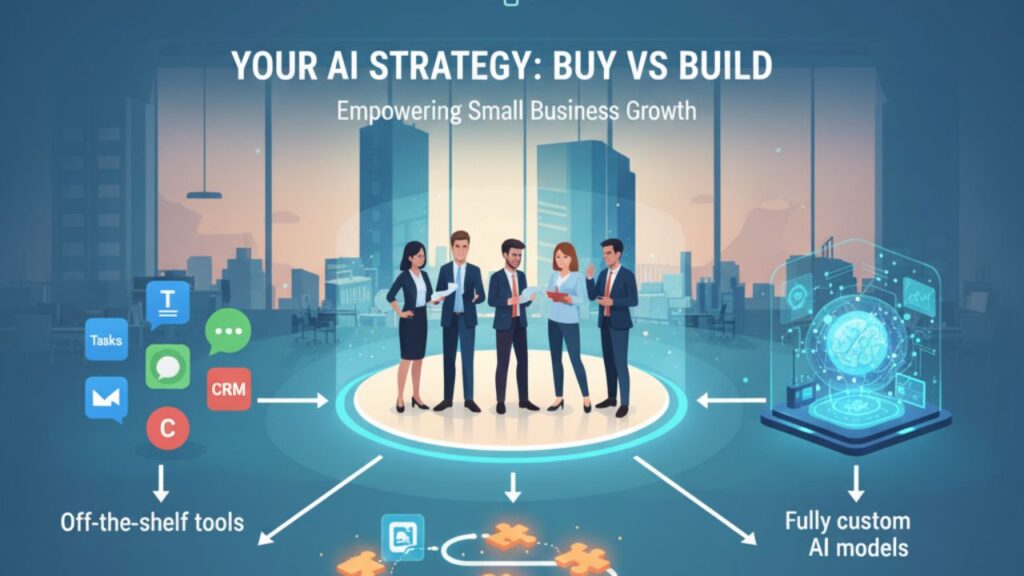
You can get value in two ways. You can buy off-the-shelf features inside products you already use, or you can build light custom pieces that connect your systems. Many SMBs start with built-in features, then add small custom automations where gaps remain.
Buy vs build at a glance
| Option | Best for | Pros | Cons |
| Off-the-shelf features in your CRM, help desk, email, accounting | Fast wins on common problems | Quick to enable, low setup, vendor maintains security | Limited to what the product offers, less tailored |
| Light custom automations and assistants using APIs and connectors | Unique workflows across multiple tools | Tailored to your process, can connect systems and add guardrails | Requires scoping, testing, and ongoing ownership |
| Fully custom models | Specialized problems and proprietary data at scale | Competitive advantage, fits your domain deeply | Highest cost and time, overkill for most SMB pilots |
Integration and data considerations
- Fit your stack: Prefer tools that integrate cleanly with your CRM, help desk, accounting, data warehouse, and storage. Avoid heavy exports and manual glue.
- Security and compliance: Confirm data handling, access controls, logging, and retention. Ask where data is stored and how models learn.
- Administration: Look for role-based permissions, audit trails, and the ability to test changes in a sandbox.
- Total cost of ownership: Include vendor fees, implementation time, training, and maintenance. The cheapest plan can be costly if it needs constant manual work.
Red flags and common mistakes
- Vague promises that do not map to a single workflow and metric.
- Black-box tools with no way to review or correct outputs.
- Over-automation that removes human checks where judgment matters.
- Deploying without a rollback or escalation path.
Here’s how to roll out your first AI project step by step
Use this simple, repeatable playbook. Keep your first pilot between four and six weeks.
Step 1. Define the problem and the success metric
Write a one-sentence problem statement. Example: “We need to reduce average first response time in support from 6 hours to 1 hour without lowering CSAT.” Pick one metric that proves success. Capture your baseline for that metric now.

Step 2. Map the current process
Draw the workflow in five to ten boxes. Note who does each step, which tools they use, what inputs they rely on, and where delays occur. Mark the exact steps where AI will assist or automate.
Step 3. Choose the smallest viable solution
Start with built-in features where possible, for example ticket summaries or draft responders in your help desk. If needed, add a light automation that calls an AI API and writes results back to your system. Limit scope to one channel, one product line, or a small percentage of traffic.

Step 4. Set up data, prompts, and guardrails
- Provide the AI with reference material such as policies, approved macros, or product details.
- Use structured prompts that include context and examples.
- Add fallbacks for low confidence outputs and a clear escalation path to a human.
- Log every AI decision with inputs and outputs so you can audit later.
Step 5. Train the team and secure buy-in
Explain the goal, the metric, and the boundaries. Show a short demo with real examples. Make it safe to flag issues. Give clear guidance on when to accept, edit, or escalate an AI suggestion.
Step 6. Run a controlled pilot
Route 10 to 20 percent of relevant work through the AI. Monitor performance daily for the first week, then at least twice per week. Compare against the baseline. Collect qualitative feedback from users and customers.
Step 7. Measure, learn, and iterate
Review the metric, the error types, and the time saved. Tune prompts, add missing reference snippets, refine thresholds, and simplify the workflow. Document lessons learned.
Step 8. Decide to scale or stop
If the pilot meets the target with acceptable risk, expand gradually to more teams, channels, or product lines. If it misses, decide whether fixes are simple or whether to pause and pick a different use case.
Pilot checklist you can copy
- Problem statement and one metric defined.
- Baseline measured and documented.
- Workflow diagram completed.
- Data sources identified and cleaned.
- Integration path chosen, off-the-shelf or light custom.
- Guardrails and escalation plan in place.
- Staff trained with a short playbook.
- Pilot cohort selected and traffic split configured.
- Daily monitoring set for week one.
- Review meeting booked for week four.
Tip: Print the one-page AI Readiness Checklist and use it in your kickoff.
What results can you expect from AI in your business?
Most SMBs see impact in three buckets within the first quarter of focused work.
- Time savings and throughput
- Support agents handle more tickets per hour with the same or better satisfaction.
- Sales reps spend more time talking to qualified prospects instead of hunting data.
- Operations teams cut document processing time from hours to minutes.
- Support agents handle more tickets per hour with the same or better satisfaction.
- Quality and consistency
- Fewer errors in data entry and categorization.
- Standardized tone and brand alignment in customer communications.
- More consistent handoffs between teams because context travels with the work.
- Fewer errors in data entry and categorization.
- Better decisions and visibility
- Faster forecasts and clearer trends in cash flow, inventory, and demand.
- Precise targeting for campaigns and offers.
- Early detection of issues, such as a sudden increase in refund requests.
- Faster forecasts and clearer trends in cash flow, inventory, and demand.
Before and after snapshots
- Customer support: Before, first response time is 6 hours with inconsistent tone. After, auto drafted replies and summaries reduce first response to 45 minutes, with CSAT stable or slightly higher.
- Marketing: Before, two weeks to draft and approve a campaign. After, AI assisted copy and segment suggestions cut cycle time to four days, with more tests running at once.
- Finance: Before, one day per week on expense categorization and reconciliation. After, automatic categorization with human spot checks reduces this to under two hours.

Watch out for these pitfalls
- Over-automation: Keep a human in the loop for decisions that affect money, safety, or compliance.
- Weak data hygiene: Bad or outdated data produces poor recommendations. Clean source lists and document data ownership.
- No change management: If people do not trust or understand the tool, they will work around it. Communicate clearly, train, and act on feedback.
- No metric discipline: Without a baseline and a target, you will not know if it worked. Hold the line on measurement.
Let’s talk about next steps and scaling your AI journey
Once your first pilot is successful, expand in three directions.
- Depth: Improve accuracy and confidence by adding better reference content, human feedback loops, and small prompt refinements. Tighten integrations so results land exactly where teams work.
- Breadth: Add new use cases that share data and workflows. For example, after support ticket drafting, move to knowledge base upkeep, then to customer outreach triggered by ticket events.
- Governance: Establish lightweight policies for model access, prompt versioning, review steps, and incident response. Create a simple scorecard for each AI use case with owner, metric, baseline, target, and status.
How AI Smart Ventures can help
- AI Advisory: Roadmaps, vendor evaluations, and readiness workshops that align to your goals. Internal link idea: AI Marketing Advisory and AI Implementation Strategy pages.
- Implementation: Rapid pilots that plug into your stack and deliver measurable wins. Internal link idea: AI Marketing Implementation and AI Your Ops.
- Training: Team sessions on prompt design, workflow mapping, and change management so adoption sticks.
Ready to see what AI can do in 30 to 45 days? Book a free AI readiness consultation with AI Smart Ventures or grab the one-page starter checklist.
- Book a free consult: We will review your stack, pick a first use case, and outline a four-week pilot.
- Download the checklist: Use it to run your kickoff meeting and keep your pilot on track.
Download the AI Readiness Checklist
How can my business start using artificial intelligence?
Start by picking one repetitive, high volume workflow with measurable outcomes, for example support replies or invoice processing. Define a single success metric and a baseline. Enable AI features in tools you already use, add guardrails and staff training, then run a four to six week pilot with 10 to 20 percent of traffic. Measure, iterate, and scale if the target is met.
What are the first AI tools SMBs should try?
Begin with the AI features inside your CRM, help desk, email marketing platform, and accounting software. These deliver fast wins, integrate with your data, and require little setup.
How do I measure AI ROI?
Pick one primary metric tied to the workflow. Examples: first response time, tickets per agent per hour, cost per lead, time to invoice, error rate, or revenue per email. Capture the baseline, set a target, and compare during the pilot.